 Fred's ImageMagick Scripts
Copyright © Fred Weinhaus My scripts are available free of charge for non-commercial (non-profit) use, ONLY. For use of my scripts in commercial (for-profit) environments or non-free applications, please contact me (Fred Weinhaus) for licensing arrangements. My email address is fmw at alink dot net. If you: 1) redistribute, 2) incorporate any of these scripts into other free applications or 3) reprogram them in another scripting language, then you must contact me for permission, especially if the result might be used in a commercial or for-profit environment. Usage, whether stated or not in the script, is restricted to the above licensing arrangements. It is also subject, in a subordinate manner, to the ImageMagick license, which can be found at: http://www.imagemagick.org/script/license.php Please read the Pointers For Use on my home page to properly install and customize my scripts. |
|
Adds a fading reflection below an image and views it in perspective. |
last modified: December 15, 2018
|
USAGE: 3Dreflection [-r rotate] [-f fade] [-o opacity] [-e exaggerate] [-b bcolor] [-z zoom] [-s shadow] [-a altitude] [-u umbra] [-p penumbra] infile outfile
-r .... rotate .......... perseptive rotation about left edge of image; PURPOSE: To add a fading reflection below an image and view in perspective. DESCRIPTION: 3DREFLECTION adds a fading reflection below an image and views it in perspective. An optional shadow may be added. Note that the optional shadow is not a formal perspective projection, but is simply an approximation. Therefore it may only look approximately correct and may get worse for larger rotations. ARGUMENTS: -r rotate ... ROTATE is the perspective rotation about the left edge of the image. Values are integers between 0 and 90 deg. The default=20 -f fade ... FADE is the percent fade to apply to the mirror image that is placed below the original image. Values are integers between 0 and 100. The default=40 -o opacity ... OPACITY is the base opacity percent for the mirror image as a whole before it is faded. Values are integers between 0 and 100. The default=100 (no extra transparency). -g gap ... GAP is a gap in pixels between the image and mirrored version below it. Values are integers greater than or equal to zero. The default=0. -e exaggerate ... EXAGGERATE is the perspective exaggeration factor. Values are floats larger than 0 and less than 3. A value of 1 is a nominal perspective view. A value of 0.5 is a near orthographic view. The default=1. -b bcolor ... BCOLOR is the background color. Any valid IM color specification is allowed. The default=none is tranparent. See http://imagemagick.org/script/color.php -z zoom ... ZOOM is the zoom factor for the output image. Values are floats greater than 0. Values larger than 1 will enlarge and values less than 1 will shrink the output. The default=1. -s shadow ... SHADOW enables or disables the optional shadow. Values are: on or off. The default=off. -a altitude ... ALTITUDE is the lighting altitude angle. Values are integers larger than 0 and less than 90 deg. The default=80. -u umbra ... UMBRA is the graylevel percent of the dark innner main part of the shadow. Values are integers between 0 and 100. The default=60. -p penumbra ... PENUMBRA is the extent in pixels of the lighter outer part of the shadow. Values are integers greater than or equal to 0. The default=4. REQUIREMENTS: This script requires my 3Drotate script to function. CAVEAT: No guarantee that this script will work on all platforms, nor that trapping of inconsistent parameters is complete and foolproof. Use At Your Own Risk. |
|
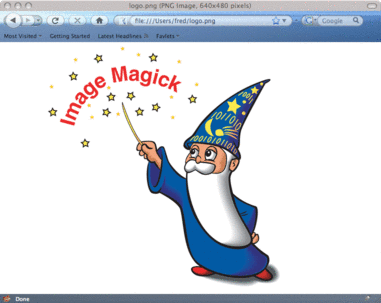
Original Image |
|
|
|
|
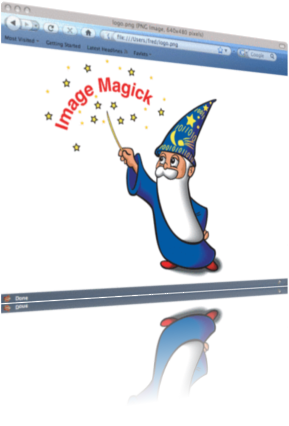
Arguments: -r 20 -s off (default) |
|
|
|
|
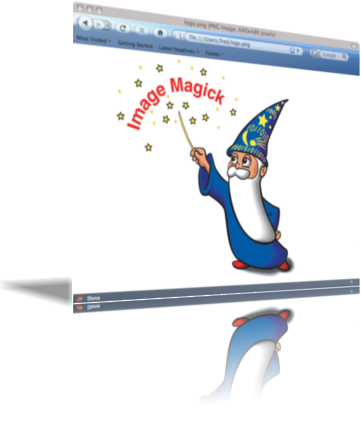
Arguments: -r 20 -s on |
|
|
|
|
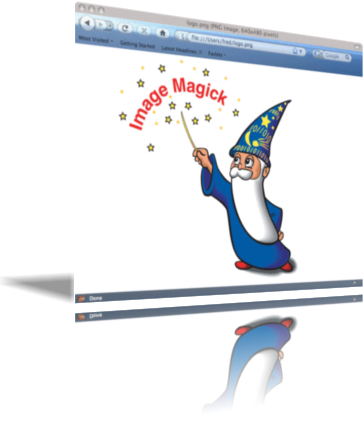
Arguments: -r 20 -s on -g 10 |
|
|
What the script does is as follows:
|