 Fred's ImageMagick Scripts
Copyright © Fred Weinhaus My scripts are available free of charge for non-commercial (non-profit) use, ONLY. For use of my scripts in commercial (for-profit) environments or non-free applications, please contact me (Fred Weinhaus) for licensing arrangements. My email address is fmw at alink dot net. If you: 1) redistribute, 2) incorporate any of these scripts into other free applications or 3) reprogram them in another scripting language, then you must contact me for permission, especially if the result might be used in a commercial or for-profit environment. Usage, whether stated or not in the script, is restricted to the above licensing arrangements. It is also subject, in a subordinate manner, to the ImageMagick license, which can be found at: http://www.imagemagick.org/script/license.php Please read the Pointers For Use on my home page to properly install and customize my scripts. |
|
Converts text to an image after applying various effects, styling and color |
last modified: August 11, 2021
|
USAGE: texteffect -t "some text" [-f font] [-p pointsize] [-S size] [-s style] [-e effect] [-l lineweight] [-d distortion] [-r rotation] [-x excess-area] [-c text-color(s)] [-o outline-color] [-b background-color] [-u under-color] [-g glow-shadow-color] [-m smudge] [-w wavecycles] [-a arc-angle] [-A gradient-angle] [-D distance] [-R rounding] [infile] outfile
-t .... "some text" ........... text to use; enclose in double quotes PURPOSE: To convert text to an image after applying various effects, styling and color. DESCRIPTION: TEXTEFFECT convert text to an image after applying various effects, styling and color. Effects include: normal, arc-top, arc-bottom, arch-top, arch-bottom, bulge, bulge-top, bulge-bottom, concave, concave-top, concave-bottom, convex, convex-top, convex-bottom, pinch, pinch-top, pinch-bottom, wave-top, wave-bottom, wedge-top, wedge-top-right, wedge-bottom-right, wedge-left, wedge-top-left, wedge-bottom-left, wedge-top and wedge-bottom. Styles include: plain, outline, glow, hardshadow, softshadow, bevel, antibevel, stamp, innerbevel, roundbevel. ARGUMENTS: -t "some text" ... The text to apply some effect, style and/or color and convert to an image. Required parameter. Be sure to enclose in double quotes. -f font ... FONT is the desired font for the text. Use a bold/italics font if you want the text to be bold/italics or use the italic option. The default is Arial. -p pointsize ... POINTSIZE is the desired pointsize for the font. The output image will be generated to the size consistent with this pointsize and any padding you apply. The default is 48. If size is specified, it will superceded the pointsize. -S size ... SIZE (approximate) of text image. The choices are WIDTHx or xHEIGHT, but not both. The default is unspecified in favor of pointsize. SIZE and POINTSIZE may not be used simultaneously. If size is specified, it will superceded the pointsize. Using WIDTHx seems to work out a bit better than xHEIGHT. -s style ... STYLE is the style of the text. The choices are plain, outline, glow, softshadow, hardshadow, stamp, bevel, antibevel, innerbevel and roundbevel. Plain is just colored text with no outline. Outline is text that has an outline or border around it of user specified thickness and presumably of a different color. Glow has an outline and a glow effect. Both shadows have an outline and a shadow effect (darkening) on the SouthEast side. You may make the outline color the same as the text or the same as the glow/shadow or even a different color. Stamp is similar to hardshadow, but has the darkening on the NorthWest side in order to make a stamped or indented effect. Bevel has brightening on the NorthWest and darkening on the SouthEast. Antibevel is the opposite with brightening on the SouthEast and darkening on the NorthWest. Bevel and antibevel allow both a line weight and smudge to soften the style. Innerbevel and roundbevel have brightenning on the Northwest side and darkening on the SouthEast side, but inside the text rather than on the outside as in Bevel. The innerbevel amount is determined by the linewt. Plain and outline allow an undercolor. The others do not. The default is plain. -i italic ... ITALIC is the font slant angle in degrees which creates an italic effect. Values are floats between -45 and 45. The default=0. -e effect ... EFFECT is the geometric shapes/distortions to apply. The choices are: normal (no effect), arc-top, arc-bottom, arch-top, arch-bottom, bulge, bulge-top, bulge-bottom, concave, concave-top, concave-bottom, convex, convex-top, convex-bottom, pinch, pinch-top, pinch-bottom, wave-right, wedge-top-right, wedge-bottom-right, wedge-left, wedge-top-left, wedge-bottom-left, wedge-top and wedge-bottom. -l lineweight ... LINEWEIGHT is the outline border thickness in pixels. Values may be floats greater than 0. Glow and shadow styles require lineweights of atleast 1. The default is 1 pixel. -d distort ... DISTORT is the control for the amount of distortion for the effect. Values may be floats between 0 and 1. The default is 0.5. Larger values produce more distortion, i.e., a greater effect. -r rotation ... ROTATION is the rotation angle for the resulting image. Values are floats ranging from -180 to 180 degrees. The default=0. -x excess-area ... EXCESS-AREA is the padding around the text. Padding will be background color. See below for background color. Excess-area (padding) is an integer greater than or equal to 0. The default is 10 pixels. -c text-color(s) ... TEXT-COLOR(S) are the colors to apply to the text. Any single valid IM color or any dual (hyphenated) opaque-opaque or opaque-none combination may be used. If a hyphenated pair of different colors is provided, a gradient effect will be produced. The default is skyblue. See http://imagemagick.org/script/color.php -o outline-color ... OUTLINE-COLOR is the color to apply to the text border or outline. Any valid IM text color may be used. The default is black. See http://imagemagick.org/script/color.php -b background-color ... BACKGROUND-COLOR is the color to apply to the background and padding if any. Any valid IM text color may be used. The default is white. Use none for transparent background. See http://imagemagick.org/script/color.php -u under-color ... UNDER-COLOR is the color to apply directly under the text, but separate from the background/padding. Any valid IM text color may be used. The default is none. See http://imagemagick.org/script/color.php -g glow-shadow-color ... GLOW-SHADOW-COLOR is the color to apply to generate a glow or shadow effect. For shadow this is typically black. Any valid IM text color may be used. The default is the outline-color. See http://imagemagick.org/script/color.php -m smudge ... SMUDGE is the spreading amount or distance for the glow, softshadow, bevel, antibevel and stamp. It is specified in pixels as a float greater than or equal to 0. The default is 3. -w wave-cycles ... WAVE-CYCLES is the number of cycles for the wave effect. Values are floats greater than zero. The default=1 (one up and down wave cycle) -a arc-angle ... ARC-ANGLE is the angle for the arc in degrees. Values must be greater than or equal to 0 and less than or equal to 360. Alternately, specify ne, se, sw or nw to automatically create the specified diagonal direction. The default=60. -A gradient-angle ... GRADIENT-ANGLE is the angle for the gradient coloration in degrees. Values must be greater than or equal to 0 and less than or equal to 360. Alternately, values of nw, ne, se, or sw may be specified to have the diagonal angle automatically, computed. For gradient-angle=0, the gradient will have the first color at the top and the second color at the bottom. As the gradient-angle is increased, the gradient rotates clockwise. The default=90. -D distance ... DISTANCE in pixels of inner bevel from border of character; Values are integers>0. The default will have bevel peak in middle of character. -R rounding ... ROUNDING amount used to convert innerbevel into roundbevel. Values are floats>0. The default=3. IMPORTANT: Please note that you can use only one instance of each argument. For example, you cannot have multiple styles (-s style) in the same command line, except as noted where some styles allow you to have an outline also, such as glow. But in those cases the outline is controlled by the -o outline-color and -l lineweight arguments. NOTE: See http://www.imagemagick.org/Usage/text/ and http://www.imagemagick.org/Usage/fonts/ for more examples and detailed explanations of how many of these styles were created. NOTE: Some effects require the use of -fx and thus will be slower than the others. These include: the variations on bulge, concave, convex and pinch for IM version prior to 6.4.3-7. The arc effect requires IM 6.3.5-5. The innerbevel and roundbevel require IM 6.5.9-1. Thanks to Aditya Naik for improvments on the techniques for generating the concave, convex, pinch and bulge effects. CAVEAT: No guarantee that this script will work on all platforms, nor that trapping of inconsistent parameters is complete and foolproof. Use At Your Own Risk. |
|
Example Text Effects |
|
|
|
Plain Normal Text Arguments: -t "SOME PLAIN TEXT" -s plain -e normal -f Arial -p 48 -c royalblue -b white |

|
|
|
|
Plain Normal Text Arguments: -t "SOME PLAIN TEXT" -s plain -e normal -f Arial -p 48 -c royalblue -b white -u lightpink |

|
|
|
|
Outline Normal Text Arguments: -t "SOME OUTLINE TEXT" -s outline -e normal -f Arial -p 48 -c skyblue -b white -o black -l 1 -u none |

|
|
|
|
Outline Normal Text Arguments: -t "SOME OUTLINE TEXT" -s outline -e normal -f Arial -p 48 -c skyblue -b white -o black -l 3 -u none |

|
|
|
|
Outline Normal Text Arguments: -t "SOME OUTLINE TEXT" -s outline -e normal -f Arial -p 48 -c skyblue -b white -o black -l 10 -u none |

|
|
|
|
Outline Normal Text Arguments: -t "SOME OUTLINE TEXT" -s outline -e normal -f Arial -p 48 -c skyblue -b white -o black -l 1 -u lightpink |

|
|
|
|
Outline Normal Text Arguments: -t "SOME OUTLINE TEXT" -s outline -e normal -f Arial -p 48 -c skyblue -b none -o black -l 1 -u none (composited onto a checkerboard background) |

|
|
|
|
Outline Normal Text Arguments: -t "SOME OUTLINE TEXT" -s outline -e normal -f Arial -p 48 -c skyblue -b skyblue -o black -l 1 -u skyblue |

|
|
|
|
Outline Normal Text Arguments: -t "SOME OUTLINE TEXT" -s outline -e normal -f Arial -p 48 -i 20 -c skyblue -b white -o black -l 1 -u lightpink |

|
|
|
|
Outline Normal Text Arguments: -t "SOME TILED TEXT" -s outline -e normal -f Arial -p 48 -b white -o black -l 1 -u none tile_disks.jpg |

|
|
|
|
Outline Normal Text Arguments: -t "SOME GLITTER TEXT" -s outline -e normal -f Arial -p 48 -c skyblue -b white -o black -l 1 -u lightpink Then Postprocess to make skyblue into transparent and add tiled blue glitter image in its place: convert \ \( SOMEGLITTERTEXT_Arial_normal_outline_d0p5_skyblue_uc_lightpink_lwt1_pt48.png -fuzz 20% -transparent skyblue \) \ null: \( tile_glitter_blue.gif -virtual-pixel tile -set option:distort:viewport $dim -distort SRT 0 \) \ -compose DstOver -layers composite \ -loop 0 -layers Optimize SOMEGLITTERTEXT_Arial_normal_outline_uc_lightpink_lwt1_pt48.gif |
Start With: Then make skyblue into transparent and add tiled glitter image 
|
|
|
|
Gradient Normal Text Arguments: -t "SOME GRADIENT TEXT" -s gradient -e normal -f Arial -p 48 -c skyblue-black -b white -o black -l 1 -u none -A 0 |

|
|
|
|
Gradient Normal Text Arguments: -t "SOME GRADIENT TEXT" -s gradient -e normal -f Arial -p 48 -c skyblue-black -b white -o black -l 1 -u none -A 180 |

|
|
|
|
Gradient Normal Text Arguments: -t "SOME GRADIENT TEXT" -s gradient -e normal -f Arial -p 48 -c skyblue-black -b white -o black -l 1 -u none -A 90 |

|
|
|
|
Glow Normal Text Arguments: -t "SOME GLOW TEXT" -s glow -e normal -f Arial -p 48 -c skyblue -b white -o black -l 1 -g blue -m 10 |

|
|
|
|
Glow Normal Text Arguments: -t "SOME GLOW TEXT" -s glow -e normal -f Arial -p 48 -c skyblue -b white -o blue -l 1 -g blue -m 10 |

|
|
|
|
Glow Normal Text Arguments: -t "SOME GLOW TEXT" -s glow -e normal -f Arial -p 48 -c skyblue -b white -o skyblue -l 1 -g blue -m 10 |

|
|
|
|
Softshadow Normal Text Arguments: -t "SOME SOFT SHADOW TEXT" -s softshadow -e normal -f Arial -p 48 -c skyblue -b white -o black -l 1 -g black -m 10 |

|
|
|
|
Softshadow Normal Text Arguments: -t "SOME SOFT SHADOW TEXT" -s softshadow -e normal -f Arial -p 48 -c skyblue -b white -o skyblue -l 1 -g black -m 10 |

|
|
|
|
Softshadow Normal Text Arguments: -t "SOME SOFT SHADOW TEXT" -s softshadow -e normal -f Arial -p 48 -c skyblue -b white -o none -l 1 -g black -m 10 |

|
|
|
|
Hardshadow Normal Text Arguments: -t "SOME HARD SHADOW TEXT" -s hardshadow -e normal -f Arial -p 48 -c skyblue -b white -l 1 -g black |

|
|
|
|
Hardshadow Normal Text Arguments: -t "SOME HARD SHADOW TEXT" -s hardshadow -e normal -f Arial -p 48 -c skyblue -b white -l 3 -g black |

|
|
|
|
Stamp Normal Text Arguments: -t "SOME STAMP TEXT" -s stamp -e normal -f Arial -p 48 -c skyblue -b white -l 1 -m 0 |

|
|
|
|
Stamp Normal Text Arguments: -t "SOME STAMP TEXT" -s stamp -e normal -f Arial -p 48 -c skyblue -b white -l 2 -m 0 |

|
|
|
|
Bevel Normal Text Arguments: -t "SOME BEVEL TEXT" -s bevel -e normal -f Arial -p 48 -c skyblue -b lightpink -l 1 -m 0 |

|
|
|
|
Bevel Normal Text Arguments: -t "SOME BEVEL TEXT" -s bevel -e normal -f Arial -p 48 -c skyblue -b lightpink -l 1 -m 3 |

|
|
|
|
Bevel Normal Text Arguments: -t "SOME BEVEL TEXT" -s bevel -e normal -f Arial -p 48 -c skyblue -b lightpink -l 2 -m 3 |

|
|
|
|
Bevel Normal Text Arguments: -t "SOME BEVEL TEXT" -s bevel -e normal -f Arial -p 48 -c skyblue -b skyblue -l 1 -m 0 |

|
|
|
|
Bevel Normal Text Arguments: -t "SOME BEVEL TEXT" -s bevel -e normal -f Arial -p 48 -c skyblue -b skyblue -l 2 -m 3 |

|
|
|
|
Antibevel Normal Text Arguments: -t "SOME ANTIBEVEL TEXT" -s antibevel -e normal -f Arial -p 48 -c skyblue -b lightpink -l 1 -m 0 |

|
|
|
|
Antibevel Normal Text Arguments: -t "SOME ANTIBEVEL TEXT" -s antibevel -e normal -f Arial -p 48 -c skyblue -b lightpink -l 1 -m 3 |

|
|
|
|
Antibevel Normal Text Arguments: -t "SOME ANTIBEVEL TEXT" -s antibevel -e normal -f Arial -p 48 -c skyblue -b lightpink -l 2 -m 3 |

|
|
|
|
Innerbevel Normal Text Arguments: -t "SOME INNERBEVEL TEXT" -s innerbevel -e normal -f Arial -p 48 -c skyblue -b lightpink -l 3 |

|
|
|
|
Roundbevel Normal Text Arguments: -t "SOME ROUNDBEVEL TEXT" -s roundbevel -e normal -f Arial -p 48 -c skyblue -b lightpink -l 3 |

|
|
|
|
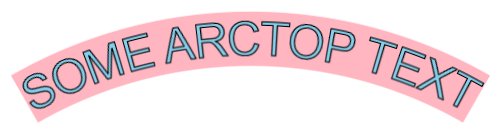
Outline Arc-Top Text Arguments: -t "SOME ARCTOP TEXT" -s outline -e arc-top -a 60 -f Arial -p 48 -c skyblue -b white -o black -l 1 -u lightpink |
|
|
|
|
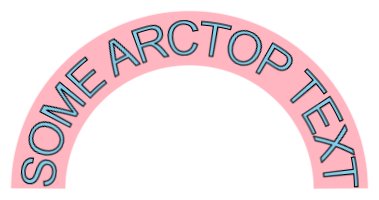
Outline Arc-Top Text Arguments: -t "SOME ARCTOP TEXT" -s outline -e arc-top -a 180 -f Arial -p 48 -c skyblue -b white -o black -l 1 -u lightpink |
|
|
|
|
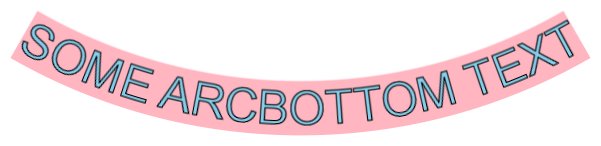
Outline Arc-Bottom Text Arguments: -t "SOME ARCBOTTOM TEXT" -s outline -e arc-bottom -a 60 -f Arial -p 48 -c skyblue -b white -o black -l 1 -u lightpink |
|
|
|
|
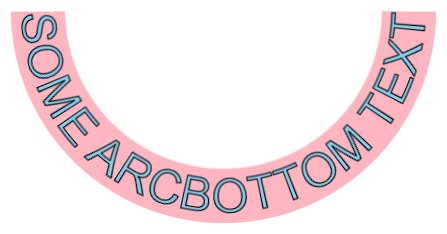
Outline Arc-Bottom Text Arguments: -t "SOME ARCBOTTOM TEXT" -s outline -e arc-bottom -a 180 -f Arial -p 48 -c skyblue -b white -o black -l 1 -u lightpink |
|
|
|
|
Outline Arch-Top Text Arguments: -t "SOME ARCHTOP TEXT" -s outline -e arch-top -d 0.5 -f Arial -p 48 -c skyblue -b white -o black -l 1 -u lightpink |

|
|
|
|
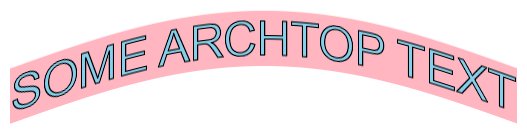
Outline Arch-Top Text Arguments: -t "SOME ARCHTOP TEXT" -s outline -e arch-top -d 1.0 -f Arial -p 48 -c skyblue -b white -o black -l 1 -u lightpink |
|
|
|
|
Outline Arch-Bottom Text Arguments: -t "SOME ARCHBOTTOM TEXT" -s outline -e arch-bottom -d 0.5 -f Arial -p 48 -c skyblue -b white -o black -l 1 -u lightpink |

|
|
|
|
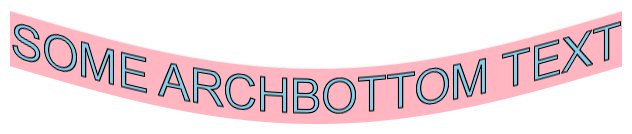
Outline Arch-Bottom Text Arguments: -t "SOME ARCHBOTTOM TEXT" -s outline -e arch-bottom -d 1.0 -f Arial -p 48 -c skyblue -b white -o black -l 1 -u lightpink |
|
|
|
|
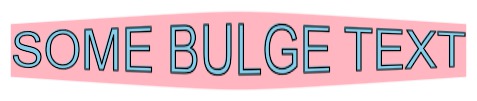
Outline Bulge Text Arguments: -t "SOME BULGE TEXT" -s outline -e bulge -d 0.5 -f Arial -p 48 -c skyblue -b white -o black -l 1 -u lightpink |
|
|
|
|
Outline Bulge-Top Text Arguments: -t "SOME BULGETOP TEXT" -s outline -e bulge-top -d 0.5 -f Arial -p 48 -c skyblue -b white -o black -l 1 -u lightpink |

|
|
|
|
Outline Bulge-Bottom Text Arguments: -t "SOME BULGEBOTTOM TEXT" -s outline -e bulge-bottom -d 0.5 -f Arial -p 48 -c skyblue -b white -o black -l 1 -u lightpink |

|
|
|
|
Outline Concave Text Arguments: -t "SOME CONCAVE TEXT" -s outline -e concave -d 0.5 -f Arial -p 48 -c skyblue -b white -o black -l 1 -u lightpink |

|
|
|
|
Outline Concave-Top Text Arguments: -t "SOME CONCAVETOP TEXT" -s outline -e concave-top -d 0.5 -f Arial -p 48 -c skyblue -b white -o black -l 1 -u lightpink |

|
|
|
|
Outline Concave-Bottom Text Arguments: -t "SOME CONCAVEBOTTOM TEXT" -s outline -e concave-bottom -d 0.5 -f Arial -p 48 -c skyblue -b white -o black -l 1 -u lightpink |

|
|
|
|
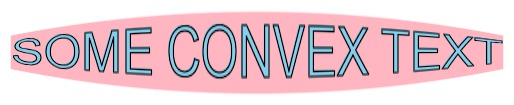
Outline Concave Text Arguments: -t "SOME CONVEX TEXT" -s outline -e convex -d 0.5 -f Arial -p 48 -c skyblue -b white -o black -l 1 -u lightpink |
|
|
|
|
Outline Concave-Top Text Arguments: -t "SOME CONVEXTOP TEXT" -s outline -e convex-top -d 0.5 -f Arial -p 48 -c skyblue -b white -o black -l 1 -u lightpink |

|
|
|
|
Outline Convex-Bottom Text Arguments: -t "SOME CONVEXBOTTOM TEXT" -s outline -e convex-bottom -d 0.5 -f Arial -p 48 -c skyblue -b white -o black -l 1 -u lightpink |

|
|
|
|
Outline Pinch Text Arguments: -t "SOME PINCH TEXT" -s outline -e pinch -d 0.5 -f Arial -p 48 -c skyblue -b white -o black -l 1 -u lightpink |

|
|
|
|
Outline Pinch-Top Text Arguments: -t "SOME PINCHTOP TEXT" -s outline -e pinch-top -d 0.5 -f Arial -p 48 -c skyblue -b white -o black -l 1 -u lightpink |

|
|
|
|
Outline Pinch-Bottom Text Arguments: -t "SOME PINCHBOTTOM TEXT" -s outline -e pinch-bottom -d 0.5 -f Arial -p 48 -c skyblue -b white -o black -l 1 -u lightpink |

|
|
|
|
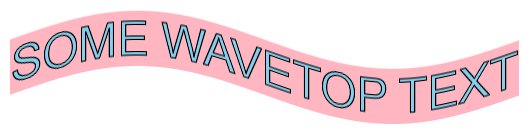
Outline Wave-Top Text Arguments: -t "SOME WAVETOP TEXT" -s outline -e wave-top -d 0.5 -f Arial -p 48 -c skyblue -b white -o black -l 1 -u lightpink |
|
|
|
|
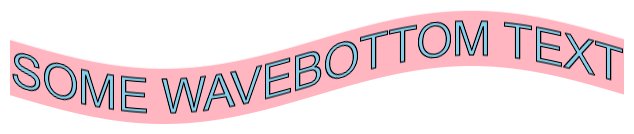
Outline Wave-Bottom Text Arguments: -t "SOME WAVEBOTTOM TEXT" -s outline -e wave-bottom -d 0.5 -f Arial -p 48 -c skyblue -b white -o black -l 1 -u lightpink |
|
|
|
|
Outline Wedge-Left Text Arguments: -t "SOME WEDGELEFT TEXT" -s outline -e wedge-left -d 0.5 -f Arial -p 48 -c skyblue -b white -o black -l 1 -u lightpink |

|
|
|
|
Outline Wedge-Top-Left Text Arguments: -t "SOME WEDGETOPLEFT TEXT" -s outline -e wedge-top-left -d 0.5 -f Arial -p 48 -c skyblue -b white -o black -l 1 -u lightpink |

|
|
|
|
Outline Wedge-Bottom-Left Text Arguments: -t "SOME WEDGEBOTTOMLEFT TEXT" -s outline -e wedge-bottom-left -d 0.5 -f Arial -p 48 -c skyblue -b white -o black -l 1 -u lightpink |

|
|
|
|
Outline Wedge-Right Text Arguments: -t "SOME WEDGERIGHT TEXT" -s outline -e wedge-right -d 0.5 -f Arial -p 48 -c skyblue -b white -o black -l 1 -u lightpink |

|
|
|
|
Outline Wedge-Top-Right Text Arguments: -t "SOME WEDGETOPRIGHT TEXT" -s outline -e wedge-top-right -d 0.5 -f Arial -p 48 -c skyblue -b white -o black -l 1 -u lightpink |

|
|
|
|
Outline Wedge-Bottom-Right Text Arguments: -t "SOME WEDGEBOTTOMRIGHT TEXT" -s outline -e wedge-bottom-right -d 0.5 -f Arial -p 48 -c skyblue -b white -o black -l 1 -u lightpink |

|
|
|
|
Outline Wedge-TOP Text Arguments: -t "SOME WEDGETOP TEXT" -s outline -e wedge-top -d 0.25 -f Arial -p 48 -c skyblue -b white -o black -l 1 -u lightpink |

|
|
|
|
Outline Wedge-BOTTOM Text Arguments: -t "SOME WEDGEBOTTOM TEXT" -s outline -e wedge-top -d 0.15 -f Arial -p 48 -c skyblue -b white -o black -l 1 -u lightpink |

|
|
|
|
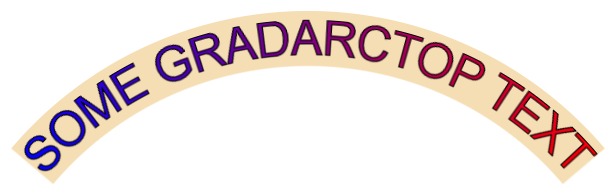
Gradient Arc-Top Text Arguments: -t "SOME GRADARCTOP TEXT" -s outline -e arc-top -a 100 -A 90 -f Arial -p 48 -c red-blue -b white -o black -l 1 -u wheat |
|
|
|
|
What the script does is as follows:
This is equivalent to the following IM commands for the case of arc-top 60 degrees,
|