 Fred's ImageMagick Scripts
Copyright © Fred Weinhaus My scripts are available free of charge for non-commercial (non-profit) use, ONLY. For use of my scripts in commercial (for-profit) environments or non-free applications, please contact me (Fred Weinhaus) for licensing arrangements. My email address is fmw at alink dot net. If you: 1) redistribute, 2) incorporate any of these scripts into other free applications or 3) reprogram them in another scripting language, then you must contact me for permission, especially if the result might be used in a commercial or for-profit environment. Usage, whether stated or not in the script, is restricted to the above licensing arrangements. It is also subject, in a subordinate manner, to the ImageMagick license, which can be found at: http://www.imagemagick.org/script/license.php Please read the Pointers For Use on my home page to properly install and customize my scripts. |
|
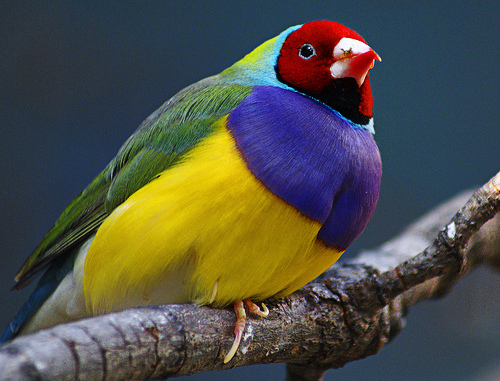
Enhances an image by high pass filtering and composition. |
last modified: December 15, 2018
|
USAGE: enrich [-r radii] [-t transparency] [-w weights] [-b bias] [-c compose] infile outfile
-r .... radii ............ two radii for sharpening; radii=large,small; PURPOSE: To enhance an image by high pass filtering and composition. DESCRIPTION: ENRICH enhances an image by high pass filtering and composition. The high pass filter is generated by subtracting a low pass filtered (blurred) version of the image from the image at two different filter sizes and then compositing them with the image with specified transparency. ARGUMENTS: -r radii ... RADII=LARGE,SMALL. Two required radii for the size of the high pass filters. Values are floats greater than 0. The default="60,3". -t transparency ... TRANSPARENCY values for two high pass filtered images. Values are floats in the exclusive range of 0 to 100. The default="40,50". -w weights ... WEIGHTS for generating the high pass filtered images by subtracting the low pass filtered images from the image. The first value is for the image and the second value is for the low pass filtered image. The same values will be used for both high pass filtered images. Values are floats greater than 0. The default="1,1". -b bias ... BIAS to be used when generating the high pass filtered images. The same value will be used for both high pass filtered images. Values are floats in the exclusive range 0 to 100. The default=50. -c compose ... COMPOSE methods to use with each high pass filtered image. Any valid IM compose method without arguments is permitted. The default="hardlight,overlay" Concept provided by Philip Morgan CAVEAT: No guarantee that this script will work on all platforms, nor that trapping of inconsistent parameters is complete and foolproof. Use At Your Own Risk. |
|
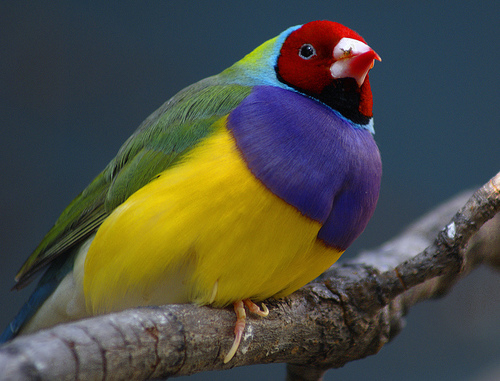
Original Image |
|
|
|
|
Arguments: (default) |
|
|
What the script does is as follows:
This is equivalent to the following IM commands.
|