Fred's ImageMagick Scripts


CONE


Draws a cone-shaped object on an image.

Download Script

last modified: May 28, 2010


USAGE: cone [-s size] [-r radii] [-c center] [-a apex] [-e ecolors] [-t tcolors] [-b bcolor] [-m mode] [infile] outfile
USAGE: cone [-help or -h]

-s .... size ....... size of background image to create if no input image
.................... is provided; The size=WIDTHxHEIGHT; Default=300x300
-r .... radii ...... x,y radii for the ellipse; comma separated list of
.................... positive integers; The default="50,50" (circle of
.................... radius=50).
-c .... center ..... center coordinates for the ellipse part of the cone;
.................... comma separate list of non-negative integers;
.................... center="xc,yc"; default="150,100".
-a .... apex ....... apex coordinates for the triangle tip of the cone;
.................... comma separate list of non-negative integers;
.................... center="x,y"; default="150,250".
-e .... ecolors .... comma separate list of ellipse fill and stroke colors
.................... and strokewidth; default="white,black,1";
-t .... tcolors .... comma separate list of triangle fill and stroke colors
.................... and strokewidth; default="tan,black,1".
-b .... bcolor ..... background color for image if no input image is provided;
.................... default="lightblue".
-m .... mode ....... mode of drawing order; choices are 1 or 2. A value of 1
.................... draws the triangle over the ellipse; A value of 2 draws
.................... the ellipse over the triangle; default=1. If infile is provided, then size and bcolor will be ignored.

PURPOSE: To draw a cone-shaped object on an image.

DESCRIPTION: CONE draws a cone-shaped object on an image. The cone is composed of two parts an ellipse (or circle) and a triangle. One can specify different colors for each along with stroke colors and strokewidths.

ARGUMENTS:

-s size ... SIZE of background image to create if no input image is provided. The size=WIDTHxHEIGHT; If only one value is provided, the second will be set equal to the first. Default="300x300".

-r radii ... RADII are the x,y radii for the ellipse. Radii are specified as a comma separated list of two positive integers. If only one value is provided, the second will be set equal to the first. The default="50,50" (i.e., circle of radius=50).

-c center ... CENTER coordinates for the ellipse part of the cone. Center is a comma separate list of two non-negative integers. If only one value is provided, the second will be set equal to the first. The default="150,100".

-a apex ... APEX coordinates for the triangle tip of the cone. Apex is a comma separate list of two non-negative integers. If only one value is provided, the second will be set equal to the first. The default="150,250".

-e ecolors ... ECOLORS is a comma separate list of thre values, namely, the ellipse fill and stroke colors and strokewidth. All 3 values must be provided. The default="white,black,1";

-t tcolors ... TCOLORS is a comma separate list of thre values, namely, the triangle fill and stroke colors and strokewidth. All 3 values must be provided. The default="tan,black,1";

-b bcolor ... BCOLOR is the background color for image if no input image is provided. The default="lightblue".

-m mode ... MODE of drawing order. The choices are 1 or 2. A value of 1 draws the triangle over the ellipse. A value of 2 draws the ellipse over the triangle. The default=1.

CAVEAT: No guarantee that this script will work on all platforms, nor that trapping of inconsistent parameters is complete and foolproof. Use At Your Own Risk.


EXAMPLES


Arguments:
-m 1 -r "50,50" -a "150,250" -c "150,100"
-t "tan,black,1" -e "white,black,1" -b lightblue

Arguments:
-m 2 -r "50,50" -a "150,250" -c "150,100"
-t "tan,black,1" -e "white,black,1" -b lightblue


Arguments:
-m 1 -r "70,70" -a "150,250" -c "150,100"
-t "tan,black,1" -e "white,black,1" -b lightblue

Arguments:
-m 2 -r "70,70" -a "150,250" -c "150,100"
-t "tan,black,1" -e "white,black,1" -b lightblue


Arguments:
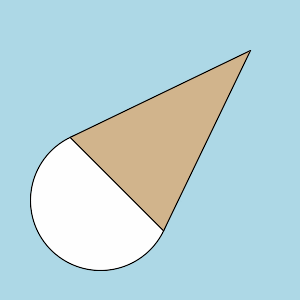
-m 1 -r "70,70" -a "250,50" -c "100,200"
-t "tan,black,1" -e "white,black,1" -b lightblue

Arguments:
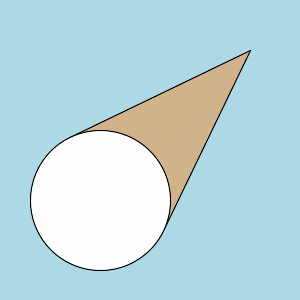
-m 2 -r "70,70" -a "250,50" -c "100,200"
-t "tan,black,1" -e "white,black,1" -b lightblue


Arguments:
-m 1 -r "50,30" -a "150,250" -c "150,100"
-t "tan,black,1" -e "white,black,1" -b lightblue

Arguments:
-m 2 -r "50,30" -a "150,250" -c "150,100"
-t "tan,black,1" -e "white,black,1" -b lightblue


Arguments:
-m 1 -r "50,80" -a "150,250" -c "150,100"
-t "tan,black,1" -e "white,black,1" -b lightblue

Arguments:
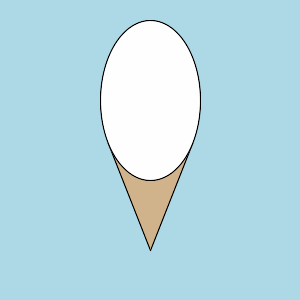
-m 2 -r "50,80" -a "150,250" -c "150,100"
-t "tan,black,1" -e "white,black,1" -b lightblue


Arguments:
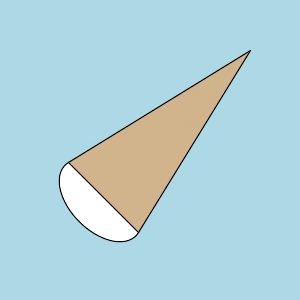
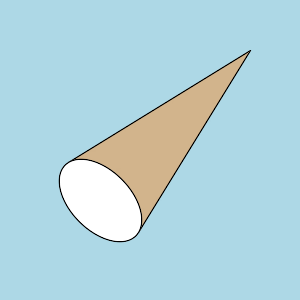
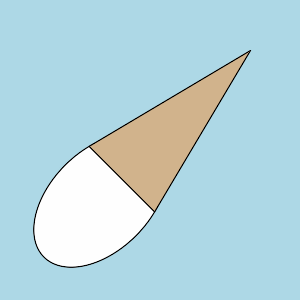
-m 1 -r "50,30" -a "250,50" -c "100,200"
-t "tan,black,1" -e "white,black,1" -b lightblue

Arguments:
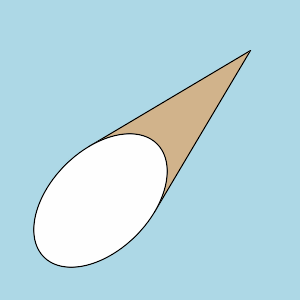
-m 2 -r "50,30" -a "250,50" -c "100,200"
-t "tan,black,1" -e "white,black,1" -b lightblue


Arguments:
-m 1 -r "50,80" -a "250,50" -c "100,200"
-t "tan,black,1" -e "white,black,1" -b lightblue

Arguments:
-m 2 -r "50,80" -a "250,50" -c "100,200"
-t "tan,black,1" -e "white,black,1" -b lightblue


What the script does is as follows:

  • Calculates distance from apex to center point of ellipse
  • Calculates rotation angle of line between apex and center point
  • Computes tangent intersections from apex to ellipse assuming
    the ellipse is centered at origin and apex is above it
  • Rotates and translates the tangent points
  • Draws triangle from apex points and two tangent intersections
  • Draws rotated ellipse at specified center with given radii

This is equivalent to the following IM commands for mode=1:

  • apex=`echo "$apex" | sed 's/ //g'`
  • x1=`echo "$apex" | cut -d, -f 1`
  • y1=`echo "$apex" | cut -d, -f 2`
  • center=`echo "$center" | sed 's/ //g'`
  • xc=`echo "$center" | cut -d, -f 1`
  • yc=`echo "$center" | cut -d, -f 2`
  • radii=`echo "$radii" | sed 's/ //g'`
  • a=`echo "$radii" | cut -d, -f 1`
  • b=`echo "$radii" | cut -d, -f 2`
  • tcolors=`echo "$tcolors" | sed 's/ //g'`
  • tcolor=`echo "$tcolors" | cut -d, -f 1`
  • tstroke=`echo "$tcolors" | cut -d, -f 2`
  • twidth=`echo "$tcolors" | cut -d, -f 3`
  • ecolors=`echo "$ecolors" | sed 's/ //g'`
  • enum=`echo "$ecolors" | tr "," " " | wc -w`
  • ecolor=`echo "$ecolors" | cut -d, -f 1`
  • estroke=`echo "$ecolors" | cut -d, -f 2`
  • ewidth=`echo "$ecolors" | cut -d, -f 3`
  • x2=`convert xc: -format "%[fx:$xc-$a]" info:`
  • y2=$yc
  • x3=`convert xc: -format "%[fx:$xc+$a]" info:`
  • y3=$yc
  • len=`convert xc: -format "%[fx:hypot(($y1-$yc),($x1-$xc))]" info:`
  • angle=`convert xc: -format "%[fx:(180/pi)*atan2(($x1-$xc),($yc-$y1))]" info:`
  • x4=0
  • y4=-$len
  • x5=$x2
  • y5=0
  • x6=$x3
  • y6=0
  • A=`convert xc: -format "%[fx:$a*$a*$y4*$y4 + $b*$b*$x4*$x4]" info:`
  • B=`convert xc: -format "%[fx:-2*$a*$a*$b*$b*$x4]" info:`
  • C=`convert xc: -format "%[fx:$a*$a*$a*$a*($b*$b-$y4*$y4)]" info:`
  • x7=`convert xc: -format "%[fx:(-$B-sqrt($B*$B-4*$A*$C))/(2*$A)]" info:`
  • x8=`convert xc: -format "%[fx:(-$B+sqrt($B*$B-4*$A*$C))/(2*$A)]" info:`
  • y7=`convert xc: -format "%[fx:($a*$a*$b*$b-$b*$b*$x4*$x7)/($a*$a*$y4)]" info:`
  • y8=`convert xc: -format "%[fx:($a*$a*$b*$b-$b*$b*$x4*$x8)/($a*$a*$y4)]" info:`
  • x9=`convert xc: -format "%[fx:($x7)cos(pi*$angle/180)-($y7+$len)sin(pi*$angle/180)+$x1]" info:`
  • y9=`convert xc: -format "%[fx:($x7)sin(pi*$angle/180)+($y7+$len)cos(pi*$angle/180)+$y1]" info:`
  • x10=`convert xc: -format "%[fx:($x8)cos(pi*$angle/180)-($y8+$len)sin(pi*$angle/180)+$x1]" info:`
  • y10=`convert xc: -format "%[fx:($x8)sin(pi*$angle/180)+($y8+$len)cos(pi*$angle/180)+$y1]" info:`
  • convert $input \
    -fill $ecolor -stroke $estroke -strokewidth $ewidth \
    -draw "translate $xc,$yc rotate $angle ellipse 0,0 $a,$b 0,360" \
    -fill $tcolor -stroke $tstroke -strokewidth $twidth \
    -draw "polygon $x1,$y1 $x9,$y9 $x10,$y10" \
    $outfile