 Fred's ImageMagick Scripts
Copyright © Fred Weinhaus My scripts are available free of charge for non-commercial (non-profit) use, ONLY. For use of my scripts in commercial (for-profit) environments or non-free applications, please contact me (Fred Weinhaus) for licensing arrangements. My email address is fmw at alink dot net. If you: 1) redistribute, 2) incorporate any of these scripts into other free applications or 3) reprogram them in another scripting language, then you must contact me for permission, especially if the result might be used in a commercial or for-profit environment. Usage, whether stated or not in the script, is restricted to the above licensing arrangements. It is also subject, in a subordinate manner, to the ImageMagick license, which can be found at: http://www.imagemagick.org/script/license.php Please read the Pointers For Use on my home page to properly install and customize my scripts. |
|
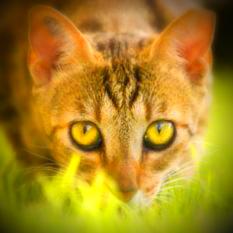
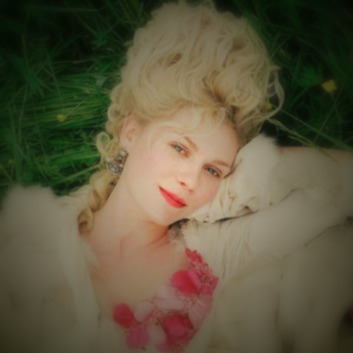
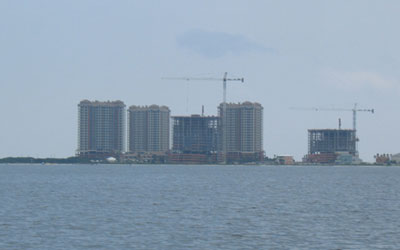
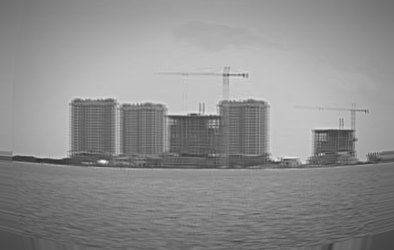
Simulates pictures taken by lomographic or holga type toy cameras. |
last modified: December 16, 2018
|
USAGE: toycamera [-g] [-i inner] [-o outer] [-d dark] [-f feather] [-b bri] [-s sat] [-h hue] [-c contr] [-t tint] [-a amount] [-S sharp] [-I iblur] [-O oblur] [-B barrel] [-D double] infile outfile
-g ............... convert image to grayscale PURPOSE: Simulates pictures taken by lomographic or holga type toy cameras. DESCRIPTION: TOYCAMERA simulates pictures taken by lomographic or holga type toy cameras. These cameras have numerous distortions due to the cheap plastic lenses. Some of these distortions include: vignetting, high saturation, blurring, barrel distortion and image doubling. Typically these cameras shoot square images, but I have left that more flexible here and up to the user to crop the image first. ARGUMENTS: -g ... First convert image to grayscale. -i inner ... INNER vignette radius as percent of image dimension. The default=0 means the vignette starts near the image center. -o outer ... OUTER vignette radius as percent of image dimension. The default=150, which is about the image corners. -d dark ... DARK the graylevel of the darkest part of the vignette in the range 0 to 100, where 0 is black and 100 is white. The default=0 -f feather ... FEATHER is the amount of feathering or smoothing of the transition around the inner radius. Values are floats>0. The default=0 -b bri ... BRI is the percent change in brightness. Values are integers. The default=0 or no change. -s sat ... Sat is the percent change in saturation. Values are integers. The default=0 or no change. -h hue ... HUE is the percent change in brightness. Values are integers. The default=0 or no change. -c contr ... CONTR is the percent change in contrast. Values are integers. The default=0 or no change. -t tint ... TINT is the overal tinting color. Any valid opaque IM color is allowed. The default=no tinting. -a amount ... AMOUNT is the overal tinting amount. Values are integers in the range 0 to 100. The default=0 meaning no tinting. -S sharp ... SHARP is the amount of sharpening to apply in the inner region. Values are floats>0. The default=0 -I iblur ... IBLUR is the amount of blurring to apply in the inner region. Values are floats>0. The default=0 -O oblur ... IBLUR is the amount of blurring to apply in the outer region. Values are floats>0. The default=0 -B barrel ... Barrel is the amount of barrel/pincussion distortion to apply. Values are floats. Positive values produce barrel distortion. Negative values produce pincussion distortion. Typical values are in the range -5 to +5. The default=0 meaning no distortion. -D double ... DOUBLE is the doubling distortion spacing in the X and Y directions. Values are comma separate integer pairs with + or - signs. There must be no spaces and the signs are required. The default=+0,+0 means no doubling. Nominal values are about 3. The values are used by the -roll function to simulate chromatic abberation for grayscale images. Requirements: IM 6.5.9-0 to support the -brightness-contrast function.
Reference: CAVEAT: No guarantee that this script will work on all platforms, nor that trapping of inconsistent parameters is complete and foolproof. Use At Your Own Risk. |
|
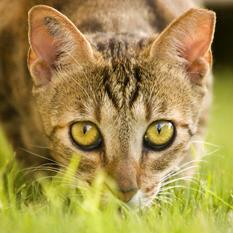
Example 1 - Lomographic |
|
Original |
|
Arguments: |
|
|
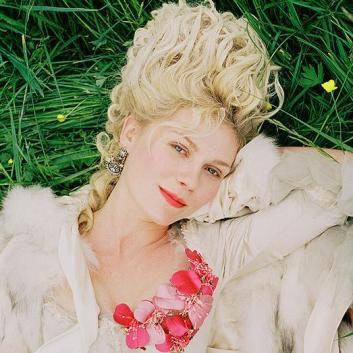
Example 2 - holga |
|
Original |
|
Arguments: |
|
|
Example 3 - holga |
|
Original |
|
|
Arguments: |
|
|
What the script does is as follows for mode=intensity:
This is equivalent to the following IM commands for mode=intensity:
|